
WestWallet
Account settings
Register on the website: westwallet.info
Login to your account and go to the Settings tab
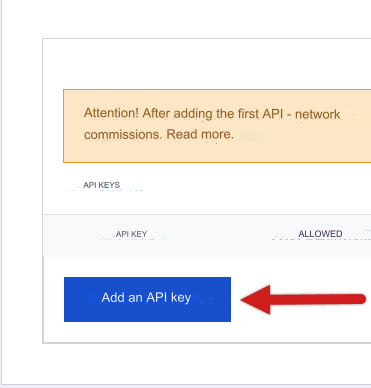
At the bottom of the page, click on the Add API key button
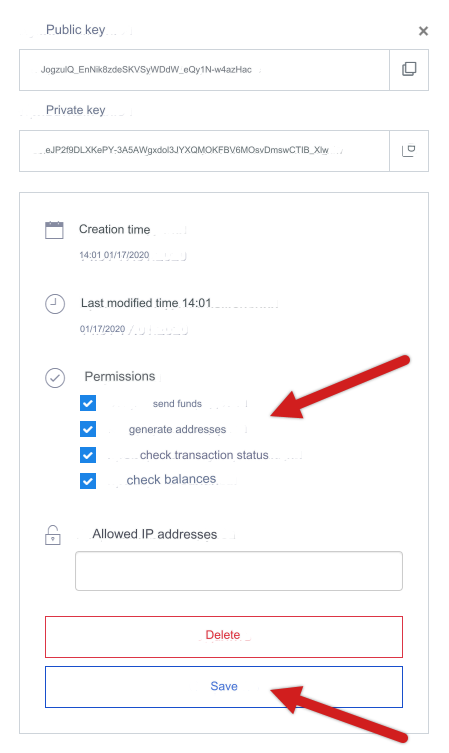
In the window that opens, copy the Public and Private keys, they will be needed for configuration in the admin panel
Check all 4 checkboxes in Permissions
Click Save
Settings in the admin panel
By default, the payment system is disabled and configured for BitCoin.
Go to settings Currency exchange - Payment systems - Disabled - WestWallet BTC
Settings only for types: Semi-automatic and Automatic
Public key - enter the Public key of your API from WestWallet settings Private key - enter the Private key of your API from the WestWallet settings Network - a network for multi-network currencies. Possible values: ERC, ERC20, TRC, TRC20, BEP, BEP20. Leave blank if network selection is not needed Save the settings.
Supported currencies
WestWallet supports the following cryptocurrencies: BitCoin - BTC currency Ethereum - ETH currency Litecoin - LTC currency Dogecoin - DOGE currency Dash - DASH currency Bitcoin Cash - BCH currency Zcash - ZEC currency Monero - XMR currency Ethereum Classic - ETC currency Ripple - XRP currency Neo - NEO currency Bitcoin Gold - BTG currency Bitcoin SV - BSV currency TRON - TRX currency Stellar - XLM currency Binance Coin - BNB currency EOS - EOS currency LEOcoin - LEO currency Chainlink - LINK currency Huobi Token - HT currency Maker - currency MKR Tether - USDT currency USD Coin - USDC currency TrueUSD - TUSD currency
Adding a new payment system based on the WestWallet API. In Ethereum example
Name of the payment system - Ethereum System type - Electronic currency Currency name - ETH Identifier - any free API - select bitcoin_westwallet System currency - select ETH - Ethereum Public key - enter the Public key of your API from WestWallet settings Private key - enter the Private key of your API from the WestWallet settings Network - leave empty Save the settings.
Other settings
For a description of other settings, see the section: Payment systems
Last updated