
Payop
Account settings
Register on the website: payop.com
1) Complete verification.
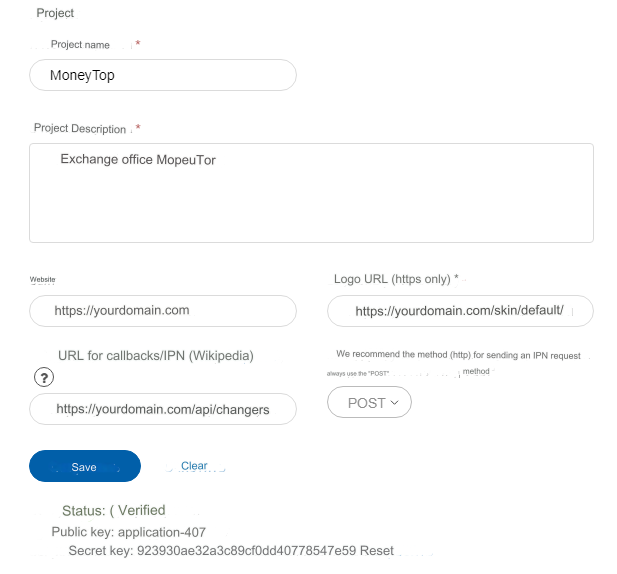
2) Add a project. Projects tab.
Project name - optional. For example, the name of your exchanger. Description of the project - optional. For example, an exchange office like this Site - enter the domain of your site Logo URL (https only) - https://yourdomain.com/skin/default/images/logo.png URL for callbacks/IPN - https://yourdomain.com/api/changers/payop/charge.php Method (http) for sending an IPN request - POST
Be sure to save your Public and Private keys.
yourdomain.com - replace with the URL of your site and save the settings.
Wait for verification.
Features
The balance is divided into sectors: Available, Reserve, Expected, Referral
More information about balance here
Recall payment in the section: Transactions - Refund
View the timing of the movement of your funds in the section: Transactions - Pending transfer
Questions and answers in this section
Ask questions payment support
Minimum amount to pay
Set the minimum amount to pay at least 1 USD
Otherwise, when selecting a payment method on the payment interfaces, the payment card will redirect to the transaction error page.
Reason: The amount of the invoice, taking into account conversion, is less than the minimum invoice amount of the payment system.

Payment methods and fees
See the section: Payment methods and in the same place Commissions
Commissions can be configured for each payment separately or for all at once.
Settings in the admin panel
By default, the payment system is disabled.
Go to settings Currency exchange - Payment systems - Disabled - Payop USD
Public key - enter the public key from your Payop project settings
Secret Key - enter the secret key from your Payop project settings
Other settings
For a description of other settings, see the section: Payment systems
Last updated