
QIWI Wallet
API Settings
Register on the website: qiwi.com by clicking on the button Donate wallet
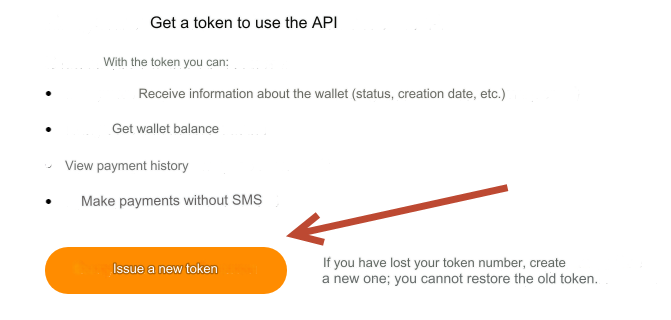
Then go to: qiwi.com/api and log into the wallet to issue a token.
Click: Issue new token.
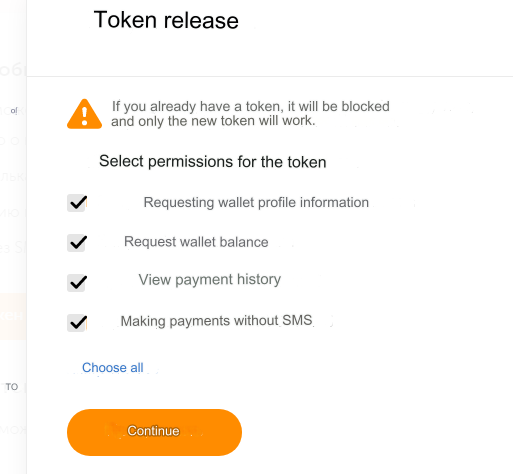
Select all available permissions for the token and click: Continue.
Save your token. Needed in the admin panel
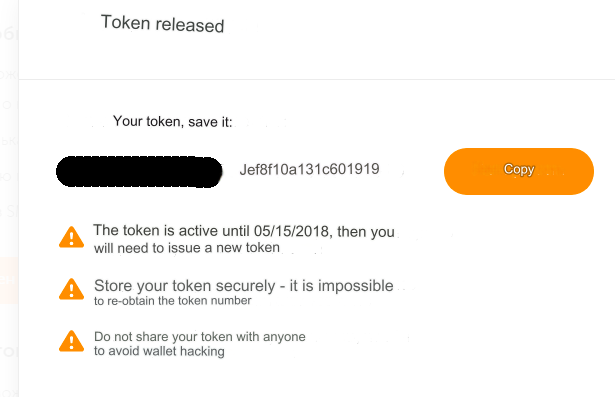
Please note. The token is active for 180 days. Then you will need to release a new one.
Payments can only be accepted in rubles (RUB) and tenge (KZT)
The QIWI API supports automatic payments only in rubles (RUB)
Tenge (KZT) - can be paid semi-automatically and manually
Dollars (USD) - can be paid semi-automatically and manually
Euro (EUR) - can be paid semi-automatically and manually
Be sure to add an account if you plan to use other currencies. By default, the account is only in rubles (RUB)
Settings and adding accounts in your QIWI personal account. Account management
Settings in the admin panel
By default, the payment system is disabled.
Go to settings Currency exchange - Payment systems - Disabled - Qiwi Wallet RUB
Settings only for types: Semi-automatic and Automatic
Account (Phone) - enter your mobile number in international format. Example: 79655754542 Token - enter the Token you received Secret key - enter a random set of Latin characters. No special characters. Example: gfhkglHGF "Cold" account - see description below Transaction duration - required. No more than an hour. Optimally 30 minutes Save the settings.
Adding a KZT account
Add a new payment.
System type - Electronic currency
Currency name - KZT
System code - QWKZT
Identifier - any free
System currency - KZT - Kazakh tenge
API - qiwiwallet
All other settings are described above
Cold account
A “cold” account is a second account, different from the main one.
A “cold” account is used only for withdrawing incoming amounts to it.
If you are using only one account, this field does not need to be filled in.
If you use a Cold account, enable the Auto receipt of stock option in the payment settings. Otherwise, the stock will be displayed other than what is available.
Working algorithm:
1) Filling out an application for exchange and paying for the application.
2) Application processing, payment of funds.
3) Transfer the received amount from the main account to the Cold account.
The API of the QIWI Wallet payment system is used.
Errors
Error codes see here
Errors are displayed with the prefix QWPRC
Example. An attempt to pay to your own wallet will return an error: Error code: QWPRC-319 - Payment impossible
Other settings
For a description of other settings, see the section: Payment systems
Last updated