
NicePay
Account settings
Register on the website: https://nicepay.io/
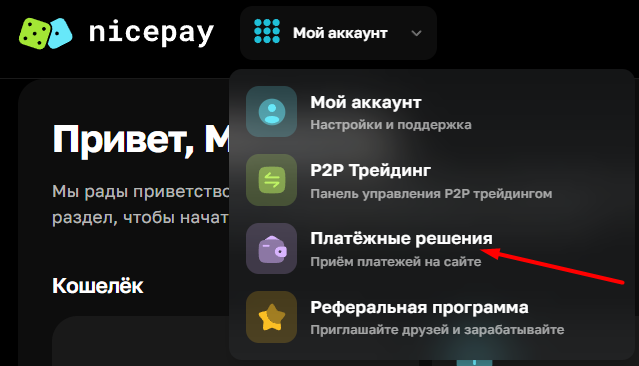
Go to the "Payment Solutions" page.
Click the "Connect a new project" button and fill out the form.
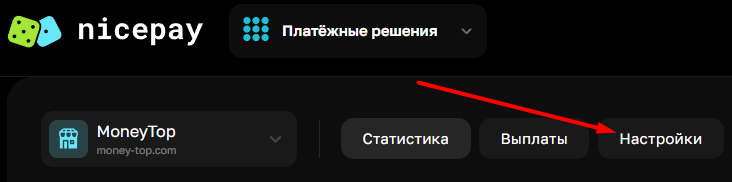
After creating the merchant, go to its settings.
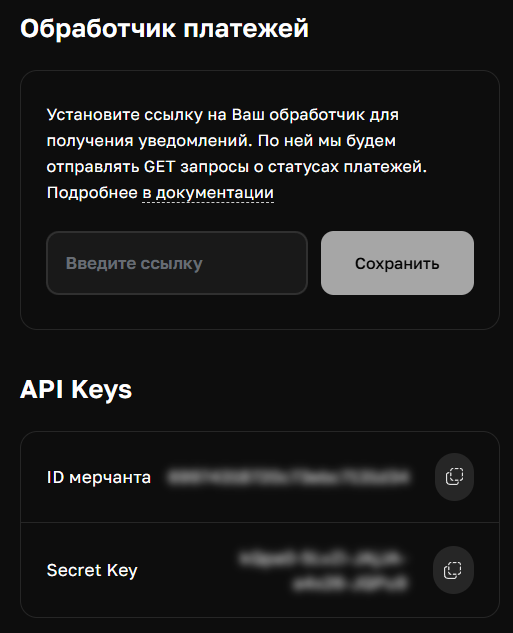
In the "Payment Processor" field, enter the link: https://yourdomain.com/api/changers/nicepay/charge.php (yourdomain.com - replace with your domain) and save.
Copy the API keys for the settings in the admin panel.
Settings in the Admin Panel
The payment system is disabled by default.
Go to settings Currency Exchange - Payment Systems - Disabled - NicePay RUB.
Settings only for the following types: Semi-Automatic and Automatic.
Merchant ID - Enter the merchant ID from the merchant settings page Secret Key - Enter the Secret Key from the merchant settings page Payment Method - Payment acceptance method. For possible values, see the page: https://nicepay.io/ru/docs/merchant/methods Payout Method - Payout method. For possible values, see Page: https://nicepay.io/docs/merchant/payout_methods Save the settings.
Other settings
For a description of other settings, see the section: Payment systems
Last updated