
AliKassa
Account settings
Send a connection request: https://merchant.alikassa.com/signup
After connecting and creating an account, log in to your account and go to Settings - Keys
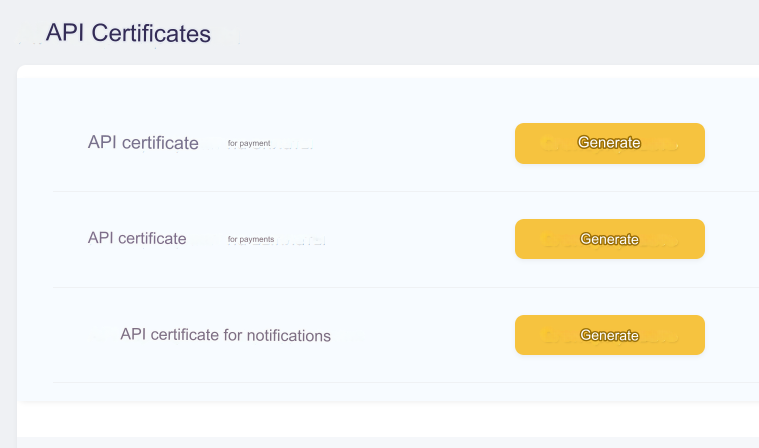
Click on all 3 Generate buttons and download the key archives
After generating all keys, click Save to activate the keys
Key files from the downloaded archives need to be uploaded to your server:
3 files from the alikassa_payment_certs.zip archive to the api/changers/alikassa/certs/payment directory
3 files from the alikassa_payout_certs.zip archive to the api/changers/alikassa/certs/payout directory
1 file from the alikassa_notification_certs.zip archive into the api/changers/alikassa/certs/notification directory
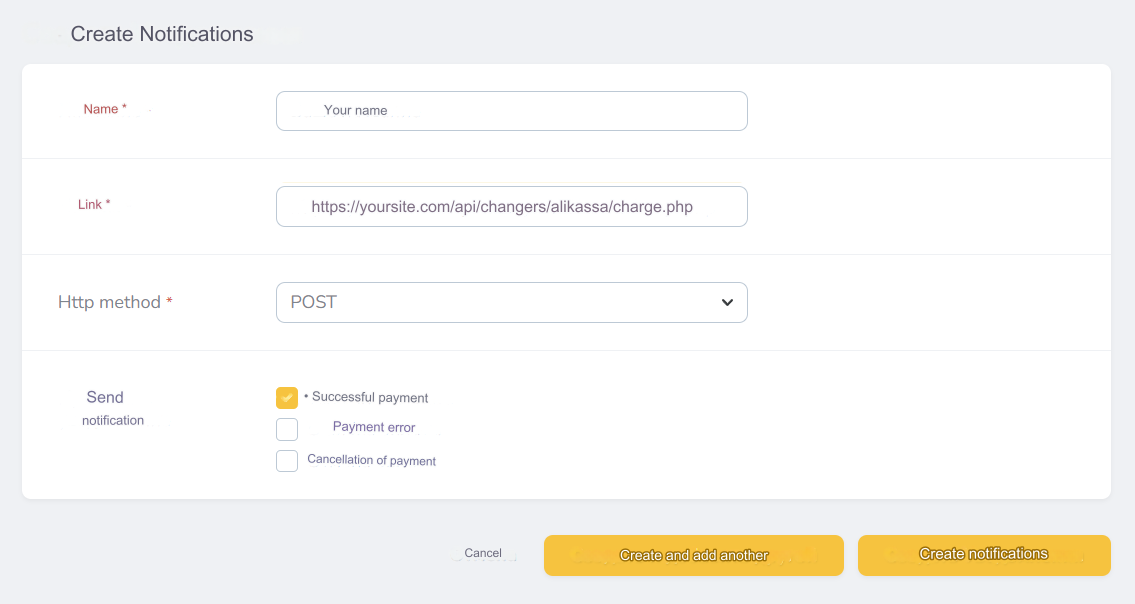
Go to Settings - Notifications, click Create Notifications and fill out the form:
Title - any
Link - enter https://yoursite.com/api/changers/alikassa/charge.php where yoursite.com is the address of your site
Http method - POST
Send Notification - Successful Payment
After completing the form, click Create Notice
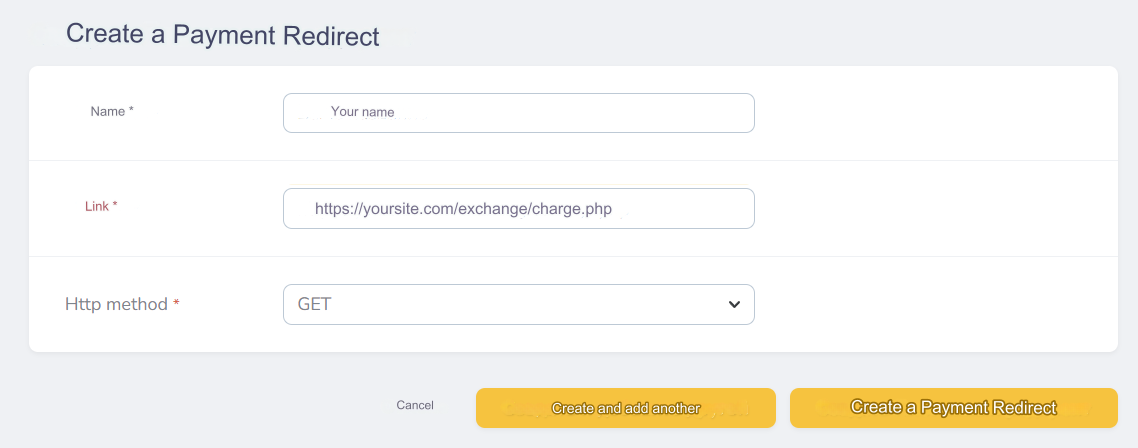
Go to Settings - Redirects, Click Create Payment Redirect and fill out the form:
Title - any
Link - enter https://yoursite.com/exchange/charge.php where yoursite.com is the address of your site
Http method - GET
After completing the form, click Create Payment Redirect
Settings in the admin
AliKassa is set up for euro cards by default
Go to settings Exchange of currencies - Payment systems - Disabled - AliKassa EUR
Settings only for types: Semi-Automatic and Automatic
Wallet UUID - the long identifier of your wallet, it can be found on the Operations - Accounts page Redirect ID - numeric ID of the redirect you created on the Settings - Redirects page Notification ID - numeric identifier of the notification you created on the Settings - Notifications page Payment service - through which service operations of receiving payments are performed, possible values: payment_card_uah_hpp, payment_card_eur_hpp, payment_card_rub_hpp, qiwi_rub_hpp, yandexmoney_rub_hpp (available to you, please check with AliKassa managers) Payout service - through which service payout operations are performed, possible values: payment_card_uah, payment_card_eur, payment_card_rub, qiwi_rub, yandexmoney_rub (available to you, please check with AliKassa managers) Save the settings.
Add a new payment system based on AliKassa API. In the Qiwi RUB example
Payment system name - Any System Type - Electronic Currency Currency name - RUB Identifier - any free one API - select alikassa System currency - select RUB - Russian ruble Wallet UUID - enter the UUID of your AliKassa wallet Redirect ID - enter the redirect ID (Settings - Redirects) Notification ID - enter the notification ID (Settings - Notifications) Payment Service - enter qiwi_rub_hpp Payout service - enter qiwi_rub Save the settings.
Other settings
For a description of other settings, see the section: Payment systems
Last updated