
Coinbase
Account settings
Register on the website: https://www.coinbase.com
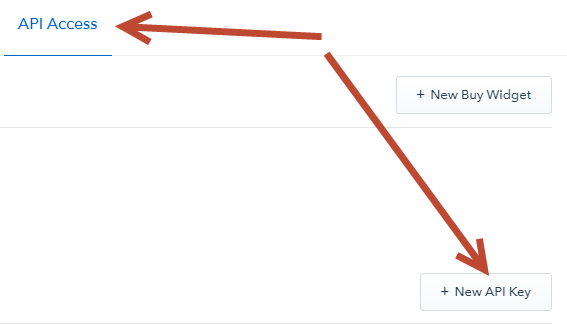
Login to your account and go to the section: Settings - API Access (https://www.coinbase.com/settings/api)
Click: New API Key
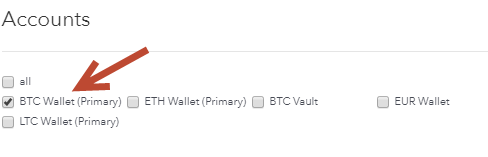
Accounts: My Wallet (Primary) - the name may be different, but it must be Primary BTC account
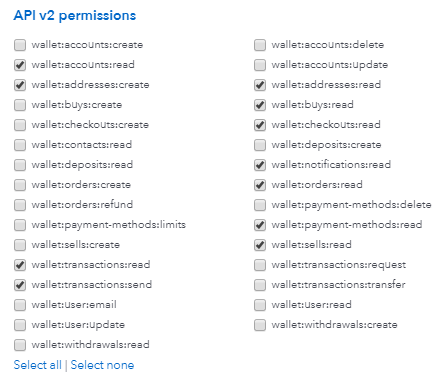
API v2 permissions: - check the boxes: wallet:accounts:read wallet:addresses:create wallet:addresses:read wallet:buys:read wallet:checkouts:read wallet:notifications:read wallet:orders:read wallet:payment-methods:read wallet:sells:read wallet:transactions:read wallet:transactions:send
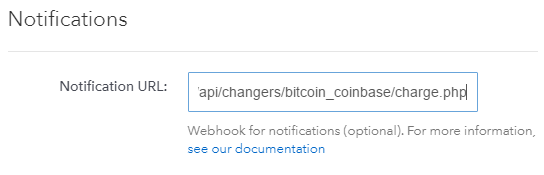
Notifications - Notification URL: https://yourdomain.com/api/changers/bitcoin_coinbase/charge.php
yourdomain.com - replace with your domain
Security settings - Allowed IP Addresses: You can enter the IP of your server for outgoing requests (optional).
Look at your main admin panel: Server IP for outgoing requests.
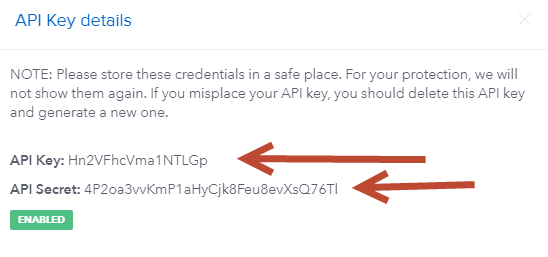
Save the settings. The system will generate your API Key and API Secret
Copy and save them
API Keys will be disabled after creation
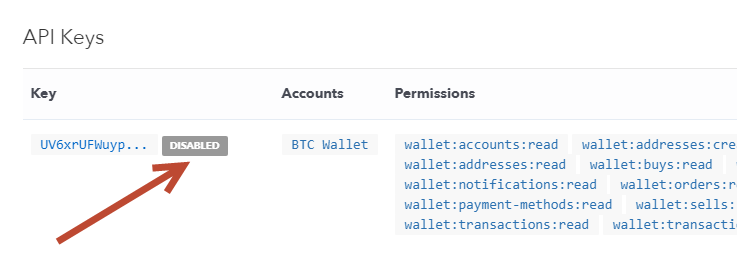
You will receive a notification by email: NOTE: For your protection this key will remain disabled for the next 48 hours.
Within 48 hours your key will be disabled. Wait for it to turn on.
You will receive a notification by email: Your API key has been enabled
If the key is disabled or entered incorrectly in the admin panel, then exchanging from this payment method to any other in Automatic and Semi-automatic modes will return an API error payment system.
Next go to: Settings - API Access
Bottom of the page: API Version and Notifications
Click: Upgrade and refresh the page if you do not see any changes.
It should be: API Version: 2017-09-08 YOU'RE UP-TO-DATE (in the example, the update date, yours will be different). The date will be needed in the settings admin
Settings in the admin panel
Go to settings Currency exchange - Payment systems - BitCoin BTC.
Settings only for types: Semi-automatic and Automatic.
API - select bitcoin_coinbase API Key - enter the API Key generated by the system API Secret - enter the API Secret generated by the system API Version - enter the date in year-month-day format (example: 2017-09-08), from the settings Settings - API Access - API Version and Notifications Save settings
Settings for Litecoin, Ethereum, Zcash, 0x(ZRX) and Bitcoin Cash
Coinbase supports Litecoin, Ethereum, Zcash, 0x(ZRX) and Bitcoin Cash
To activate these cryptocurrencies in the settings Settings - API Access - Accounts check the boxes opposite LTC Wallet (Primary) ETH Wallet (Primary) ZRX Wallet (Primary) BCH Wallet (Primary)
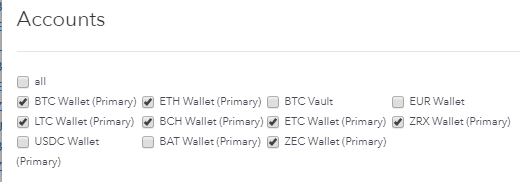
Example of adding Litecoin
Name of the payment system - Litecoin System type - Electronic currency Currency name - LTC Identifier - litecoin API - select bitcoin_coinbase System currency - select LTC - LiteCoin API Key - enter the API Key generated by the system API Secret - enter the API Secret generated by the system API Version - enter the date in year-month-day format (example: 2017-09-08), from the settings Settings - API Access - API Version and Notifications Save settings
Example of adding Bitcoin Cash
Name of the payment system - Bitcoin Cash System type - Electronic currency Currency name - BCH Identifier - btccach API - select bitcoin_coinbase Icon - bitcoincash System currency - select Bitcoin Cash API Key - enter the API Key generated by the system API Secret - enter the API Secret generated by the system API Version - enter the date in year-month-day format (example: 2017-09-08), from the settings Settings - API Access - API Version and Notifications Save settings
Other settings
For a description of other settings, see the section: Payment systems
Last updated