
ePayCore
Registration
Register on the website epaycore.com and be sure to go through verification. Without verification, the APIs will not work.
Go to the Accept payments - API connection tab.
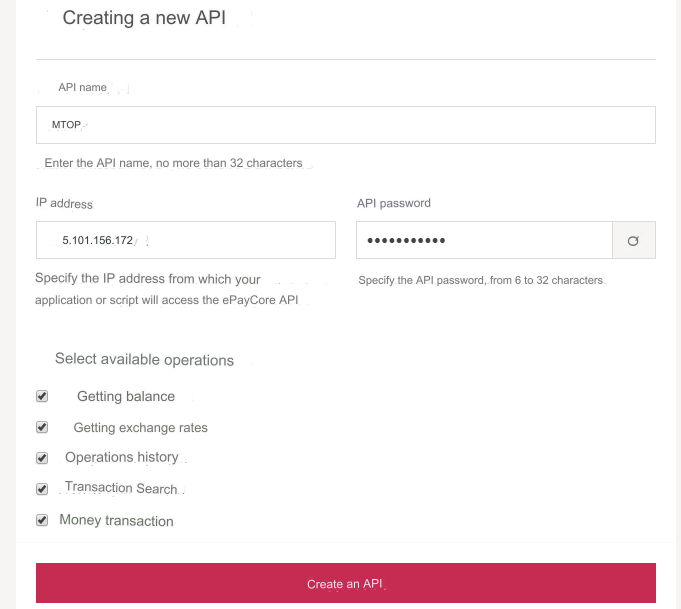
Creating a new API
API name - any, short name of your exchange office. IP address - enter the server IP for outgoing requests. Look at your main admin panel: Server IP for outgoing requests. API password - a set of Latin characters. Write it down, you will need it in the admin panel. Select available operations - select all available Click the Create API button.
Go to the Payment Acceptance - SCI Connection tab.
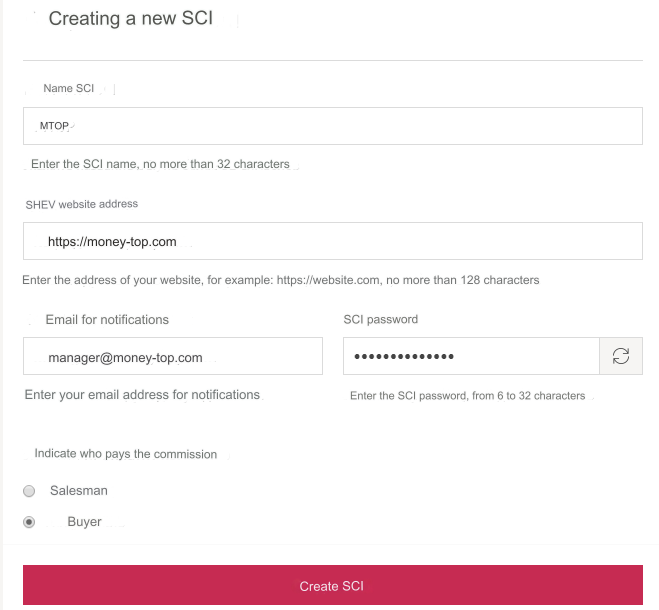
Creating a new SCI
SCI name - any, short name of your exchange office. WEB site address - enter the URL of your site E-mail for notifications - enter the E-mail to which you want to receive notifications. SCI password - a set of Latin characters. Write it down, you will need it in the admin panel. Indicate who pays the commission - optional Click the Create SCI button.
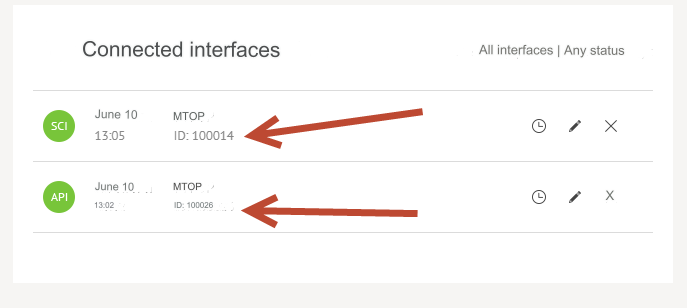
SCI ID и API ID
In the admin panel you will need to enter SCI ID and API ID.
Go to the tab Accepting payments - Connected API/SCI interfaces.
Here you will see all the necessary IDs.
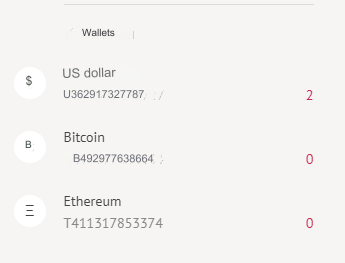
Your wallets
In the admin panel you will need to enter your wallet.
In the block on the left you will see all available ones.
Settings in the admin panel
By default, the payment system is disabled.
Go to settings Currency exchange - Payment systems - Disabled - ePayCore USD
Settings only for types: Semi-automatic and Automatic
SCI ID - enter SCI ID from the SCI settings in the ePayCore system. SCI Password: - enter the SCI password from the SCI settings in the ePayCore system. Wallet: - enter the wallet with the prefix U. For example: U362917327787 API ID - enter API ID from the API settings in the ePayCore system. API Password: - enter the API password from the API settings in the ePayCore system. Save the settings.
Adding Bitcoin ePayCore payment
Add a new payment.
System type - Electronic currency
Currency name - BTC
System code - BTC
Identifier - any free
System currency - BTC - BitCoin
API - epaycore
Wallet: - enter the wallet with the prefix B. For example: B492977638664
All other settings are described above. For a new wallet, add new APIs and SCI
Restrictions
Minimum payment amount is 1 USD. Take this into account in the course settings for the directions (Minimum amount for exchange).
Payment to your own wallet is not supported.
Other settings
For a description of other settings, see the section: Payment systems
Last updated