
Affiliate program
Description
All accruals under the affiliate program are carried out at the rate of VU-Money payment system
The internal currency of the site (balance) is configured in the section: Settings - Configuration - Internal currency of the site (balance)
After changing the settings Internal currency of the site (balance) update the settings VU-Money payment system
Even if you disable the VU-Money payment, it will still be displayed in the courses in the admin panel.
BE SURE to set up courses in all areas: VU-Money => All payments All payments => VU-Money After changing internal currency of the site (balance) and updating the settings VU-Money payments be sure to reconfigure the rates in all directions: VU-Money => All payments All payments => VU-Money
The affiliate receives a reward depending on his level of the affiliate program.
The level of the affiliate program depends on the total amount of income of the affiliate.
The percentage of a affiliate’s income may differ if the exchanger’s commission in the direction is positive, negative or zero
Affiliate program settings
1. - all fields must be filled in.
2. - intervals of amounts must be logical.
3. - the amount interval cannot be repeated.
Affiliate's percentage (x > 0) - affiliate's percentage of the exchange amount when the administration's income (commission) is positive.
Affiliate's percentage (x = 0) - affiliate's percentage of the exchange amount when the administration's income (commission) is zero.
Affiliate's percentage (x < 0) - affiliate's percentage of the exchange amount when the administration's income (commission) is negative.
Example screenshot:
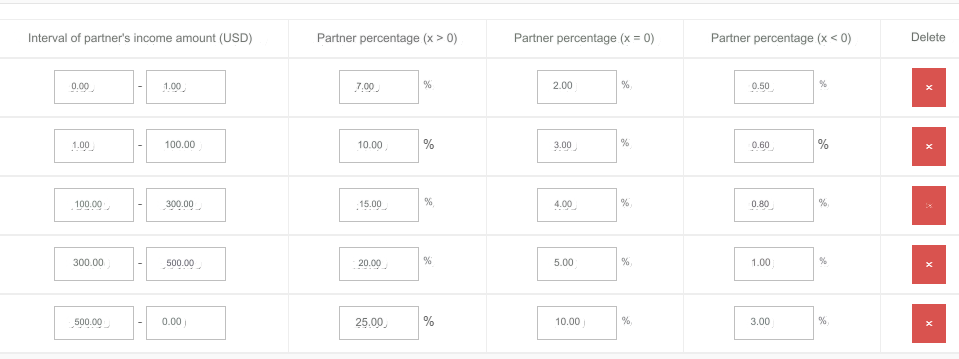
The last field of the affiliate’s income amount interval in the table: 0.00 = infinity
Description, statistics and advertising materials for affiliates on the Affiliate Program page in the user control panel.
We recommend ordering your own advertising materials from studios that create banners, or making them yourself.
Accrual statistics in the admin panel in the section: Affiliate statistics and section: Finance - Balance.
Withdrawal settings in the section: Finance - Withdrawal
Individual affiliate percentage
You can set an individual percentage for each affiliate.
See section List of users - Individual affiliate percentage
Protection against cheating
Multiple user registrations with further attempts to make money on the affiliate program by making exchanges will lead to nothing.
Attempts to exchange using your own referral link are also useless.
The system checks entries by IP, and compares them repeatedly and over different periods of time.
Having detected cheating, the system will not record the referral, or will clear his referral.
Affiliate statistics
This section contains statistics on accruals for the affiliate program.
Including the source where the referral came from.
If there is no source, then the referral simply pasted the link with the affiliate’s ID into the browser line, or followed the link from instant messengers.
It is possible that the referral uses link shortening sites. For example, like this one: https://to.click/ In this case, it is difficult to understand where the referral came from.
There are still many possibilities to hide the source. They don’t like to click on referrals on the Internet. links, so shortening (encrypting) the link is a reasonable action.
Please note that the Source option was added only in version 8.0. There will be no sources in the statistics for the time before the installation of update 8.0.
Last updated