
Perfect Money
Registration
Register in the system: https://perfectmoney.is/signup.html
Account type - choose as you wish.
Interface settings
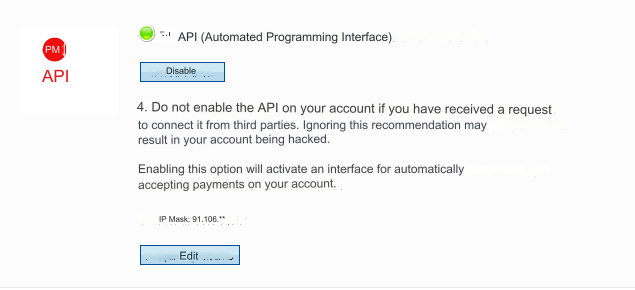
After registration and authorization, follow the path: Settings - Security - Change security settings - API - enable.
IP Mask: - enter the IP of your server.
Look at your main admin panel: Server IP for outgoing requests.
Next: Settings - Edit profile - Alternative passphrase
Enter a set of Latin characters and save the settings.

We recommend that you verify your account. Increase the trust of your users.
Settings in the admin panel
Go to settings Currency exchange - Payment systems - PerfectMoney USD/EUR.
Settings only for types: Semi-automatic and Automatic.
Account - enter the account you will use for payment. For PerfectMoney USD with the prefix U. Example: U6497947 For PerfectMoney EUR with prefix E. Example: E3069142 Alternative passphrase - enter a set of Latin characters identical to that entered in the Alternative passphrase field in your Perfect Money account. Member ID - enter Your personal Member ID that you received. Password - enter the password to log into your Perfect Money account. Don't forget to change your login password in the admin area if you change it in your Perfect Money account. Save the settings.
Other settings
For a description of other settings, see the section: Payment systems
Last updated