
Texts by directions
Main
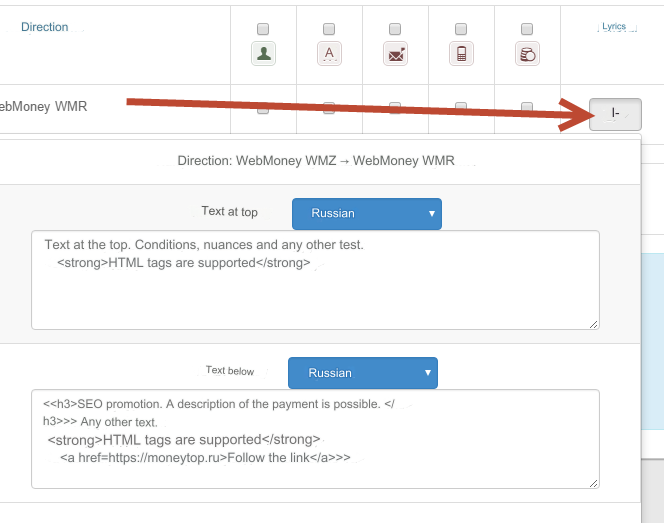
Go to the admin section: Currency exchange - Directions (options)
Click on the Texts icon for the desired direction.
In the drop-down window, enter the texts you need.
You can use HTML tags. Line break = ENTER
After filling out the texts you need for the directions, click the Submit button at the bottom of the page.
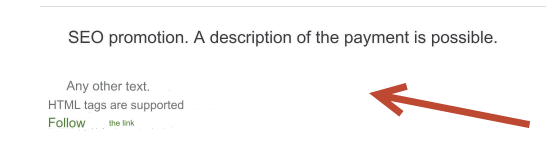
As a result, in the direction in the second step (filling out the application)
Top

Bottom
Additional variables
You can use additional variables in texts with information about payment systems and exchange rates:
{fpaysys} - full name of the incoming payment system
{tpaysys} - full name of the outgoing payment system
{fcur} - currency of the incoming payment system
{tcur} - currency of the outgoing payment system
{fkurs} - incoming payment system rate excluding commissions (use both rates for accurate information)
{tkurs} - outgoing payment system rate excluding commissions (use both rates for accurate information)
{comis} - exchanger commission in percentage
{mincomis} - the minimum amount of the exchanger commission in the currency of the outgoing payment system
{maxcomis} - the maximum amount of the exchanger commission in the currency of the outgoing payment system
Moving texts
The texts are already inserted in the template template/default/exchange/index_2.htm - the second step of completing the application.
You can move these texts to another location in this template.
Text at top
{if $kurs['headtext']}
<div class="alert alert-info">
{dhtmlspecialchars_decode(nl2br($kurs['headtext']))}
</div>
{/if}
Text at bottom
{if $kurs['botmtext']}
{dhtmlspecialchars_decode(nl2br($kurs['botmtext']))}
{/if}
Last updated