
AnyMoney
Account settings
Register on the website: any.money
Log in to your account and create a merchant with any name and without linking to a paysys.
Go to Merchant settings.

On the Main tab:
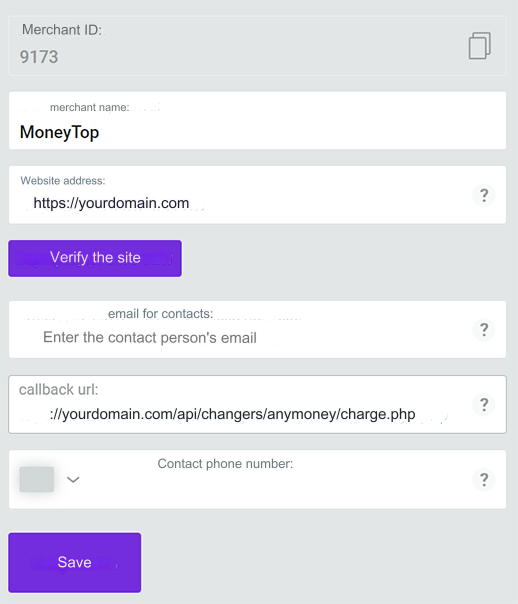
Copy the merchant's id, you will need it for settings in the admin panel.
Enter your site address and verify it (follow the instructions on the site).
Enter callback url: https://yourdomain.com/api/changers/anymoney/charge.php (replace yordomain.com with your domain).
Save the settings.
On the SCI tab, all settings are optional.
On the Payment Directions tab, select the methods that will be available to accept payments.
On the Payment Directions tab, select the methods that will be available for payments.
On the Security tab, click on both key derivation buttons in turn. Save them for settings in the admin panel.
In the ip address of the server field, enter your IP server for outgoing requests and click add.
Settings in the admin
Go to settings Currency Exchange - Payment Systems - Disabled - AnyMoney USD
Settings only for types: Semi-Automatic and Automatic
Merchant ID - enter your merchant id SCI Secret Key - enter the SCI key obtained on the Security page API Secret Key - enter the API key obtained on the Security page Payment Method Code - enter a payment method code to limit payment of the application to one method. Leave blank to not restrict. Payout Method Code - enter the payout method code Save the settings.
Examples of payment method codes: card, iban, worldcard, visamc_p2p, mobile, anycash, btc, eth, ltc, tron, trc20, erc20
Supported currencies
AnyMoney supports the following currencies: USD - US dollar EUR - Euro UAH - Ukrainian hryvnia KZT - Kazakhstan tenge RUB - Russian ruble UZS - Uzbek soum USDT - Tether BTC - Bitcoin ETH - Ethereum LTC - Litecoin TRX - TRON
Adding a new payment system based on AnyMoney API. In the example of EUR card
Name of the payment system - Any System Type - Bank Card Currency name - EUR Identifier - any free one API - select anymoney System currency - select EUR - Euro Merchant ID - enter your merchant id SCI Secret Key - enter the SCI key obtained on the Security page API Secret Key - enter the API key obtained on the Security page Payment Method Code - enter card Payout Method Code - enter card Save the settings.
Other settings
For a description of other settings, see the section: Payment systems
Last updated