
YooMoney
Step 1
Login to the YuMoney system: https://yoomoney.ru/
Proceed to creating an application: https://yoomoney.ru/myservices/new
Fill in the fields:
Name for users - the optimal name for your AOP
Site address - enter the URL of your site
Redirect URI - https://yourdomain.com/api/changers/yandex/token.php (yourdomain.com - replace with your domain)
Verify application authenticity (OAuth2 client_secret) - be sure to check the box
Click That's right
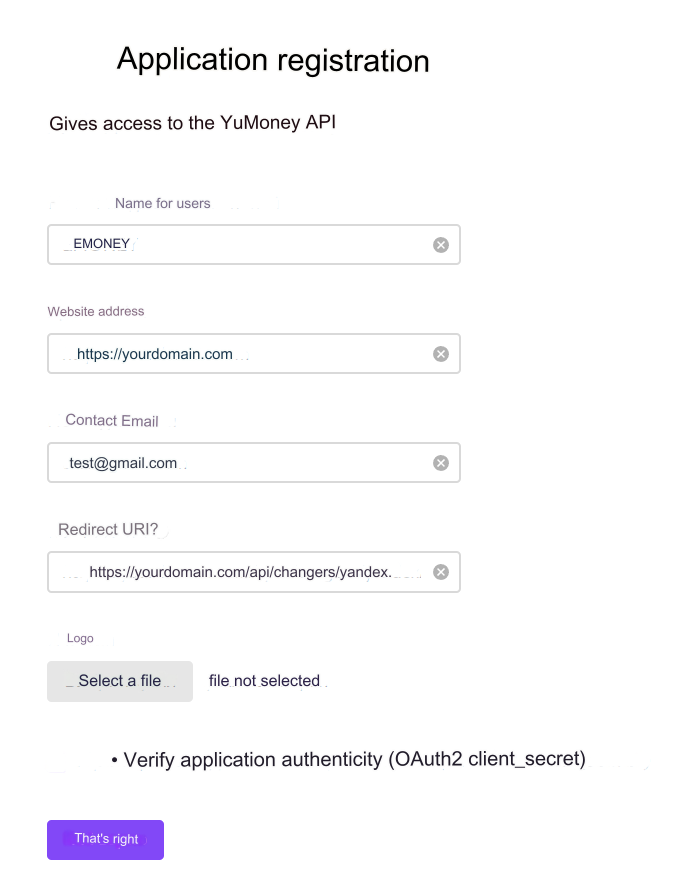
The application is registered. You will receive data:
*1 Application ID (client_id) and *2 OAuth2 client_secret
This data will be needed in the admin panel
Step 2
Next, proceed to setting up an HTTP notification: https://yoomoney.ru/transfer/myservices/http-notification
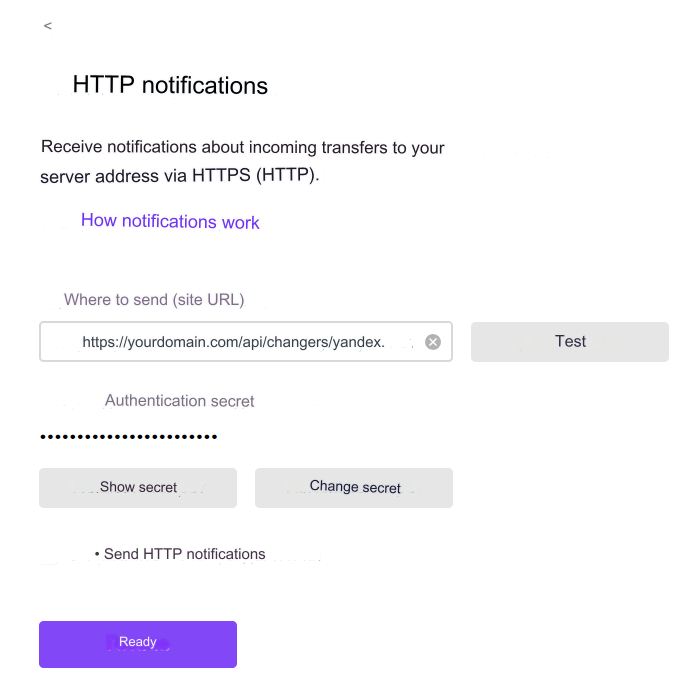
Fill in the fields:
Where to send (site URL) - https://yourdomain.com/api/changers/yandex/charge.php (yourdomain.com - replace with your domain )
Click Show secret - this is *3 Secret key, which will be needed in the admin panel
Send HTTP notifications - be sure to check the box
Click Finish
Step 3. Settings in the admin panel
Go to settings Currency exchange - Payment systems - YuMoney RUB.
Settings only for types: Semi-automatic and Automatic.
Wallet - enter your wallet number. Secret key - enter a set of Latin characters identical to that entered in the *3 Show secret field in your YuMoney account. Application ID - enter the *1 Application ID that you received. OAuth2 client_secret - enter the *2 OAuth2 client_secret that you received. Token - click Get token Save the settings. Please note! The token must be active. Important! Receive the token only to the entered YuMoney wallet

Important! YooMoney takes a commission from the recipient Therefore, the actual commission is taken into account when placing an application. In the admin panel in the field: Incoming system commission enter the real commission. At the time of writing the documentation commission: 0.50% If the Incoming system commission is specified incorrectly, you will receive the error: The hash of the exchange amount does not match
If you need to pay by card
Add a new payment card and select API yandex_card
How to add a payment card, see the section: Processing API
Next, register a new application (description above).
Keep in mind that the HTTP notification address and Redirect URI will be different
In our example:
HTTP notification address: https://yourdomain.com/api/changers/yandex_card/charge.php (yourdomain.com - replace with your domain)
Redirect URI: https://yourdomain.com/api/changers/yandex_card/token.php (yourdomain.com - replace with your domain)
Important! You can configure only one HTTP notification address, even if you have several applications. The solution is to use different accounts and configure applications and HTTP notification addresses for each account
Please note that when paying with a card the commission is different. At the time of writing the documentation 2%
Other settings
For a description of other settings, see the section: Payment systems
Last updated