
Rates
Description
Important! Even if the affiliate program is turned OFF. Be sure to set up VU-Money payment system rates VU-Money => All payments All payments => VU-Money Your income is calculated at these rates. Details in the section: Currency exchange - Affiliate program
In this section, course settings for each direction.
Rates are updated according to the settings of Scheduler (CRON) when any user logs into the site.
For a more stable update of rates, we recommend setting up CRON server for exchange rates
The source of receiving courses can be configured for each direction.
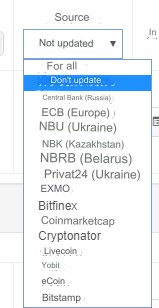
Currency sources: 1) Central Bank of the Russian Federation 2) National Bank of Ukraine 3) Privat 24 (Ukraine) 4) European Central Bank 5) National Bank of the Republic of Belarus 6) National Bank of Kazakhstan
Cryptocurrency sources: 1) EXMO 2) Bitfinex 3) Cryptonator 4) Yobit 5) Bitstamp 6) Binance 7) Coinbase 8) HitBTC 9) LocalBitcoins 10) Kuna 11) Poloniex 12) Bitexbook 13) Cryptocompare 14) OKcoin 15) Bittrex 16) Garantex 17) Cryptonex 18) OKX 19) BitPay 20) BitMart 21) BlockChain 22) BitDelta
You can update courses manually by clicking on the link Updating courses
Courses will be updated if you do NOT have Do not update set for the selected direction.
Functions for obtaining courses in API source files. Directory: api/sources.
Which site for receiving courses is chosen, that’s what we will receive from. The average trading rate is taken.
Rate change date is displayed in the list of courses Info - Change date.
Additional settings
Commission - the commission of the exchange office in this direction.
Neg. (Negative?) - a bearish game (for example, if you have an excess of some currency and you can give it away cheaper than the current rate, or you simply need a rate that should be lower than the existing one). If the checkbox is checked, the exchange office commission will work as a bonus.
Example: Direction - WebMoney WMZ => WebMoney WMR Rate - 34.3681 Commission - 0.5% (0.1718405) (math: 34.3681 * 0.5 / 100) Final rate - 34.3681 - 0.1718405 = 34.1962595 (rounded to 34.19626) Check the Reg. (Negative?) Final rate - 34.3681 + 0.1718405 = 34.5399405 (rounded to 34.53994) The payment system commission is not taken into account in this miscalculation.
Min. commission - the amount of the minimum commission of the exchange office. Regardless of the exchange amount, the exchange office commission will not be lower than the specified number.
Max. commission - the amount of the maximum commission of the exchange office. Limit on the amount of the exchange office commission. If 0, then the commission is not limited.
Min. amount for exchange - it is impossible to complete an application less than the entered amount. Please enter!
Max. amount for exchange - not filled in or 0, the maximum for exchange is limited by the stock (reserve) of outgoing currency. I.e. the currency that your user will receive.
Example with min. limit. and max. amount
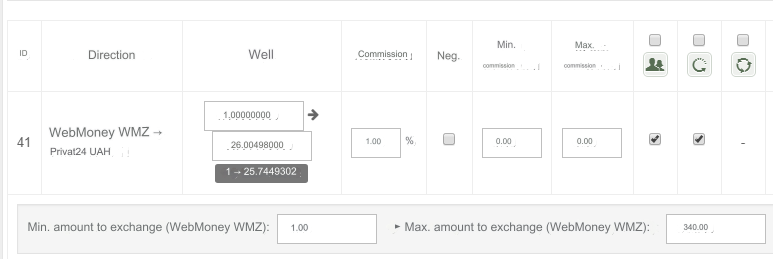
Min. amount to exchange: 1 WMZ
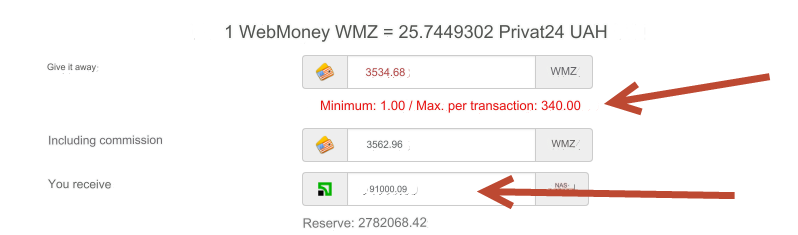
Max. amount to exchange: 340 WMZ, i.e. equivalent at Privat24 UAH ~ 8750
It is impossible to complete an application if the client wants to receive 91000 Privat24 UAH
Example with min. limit. amount
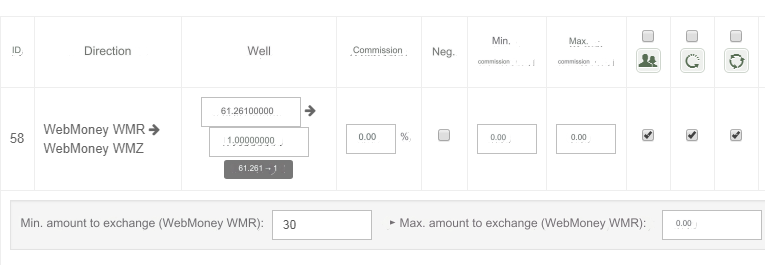
Min. amount to exchange: 30 WMR
Max. amount to exchange: 0, i.e. not limited.
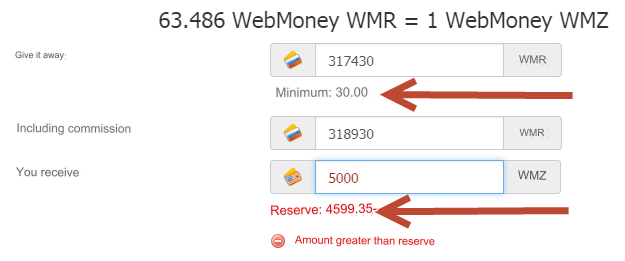
In the example, stock (reserve) WMZ 4599.35.
It is impossible to complete an application if the amount to be received exceeds the reserve.
Settings for exchange types by direction
Processing by operator - the checkbox for directions is set = the processing by operator type is active for this direction.
Semi-automatic - the checkbox for directions is set = the semi-automatic type is active for this direction. Available if the incoming currency has an API connected
Automatic - the checkbox for directions is set = the automatic type is active for this direction. Available if both currencies have API connected
Invoicing - the checkbox for directions is set = the invoicing type is active for this direction. Available if both currencies have API connected. For more information about the type, see the "Invoicing" section
Direction restrictions
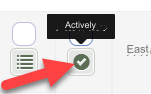
Active - direction status. The checkbox is unchecked, the direction will be disabled. Attention! You independently monitor the conditions of each of the payment systems and are obliged to comply with the restrictions. If one of the payment systems prohibits exchange to another payment system, then you are obliged to disable this direction.
Auto-update rates
The source is selected and the rates will be updated according to the settings of Scheduler (CRON) Select Do not update - rates in this area will not be updated.
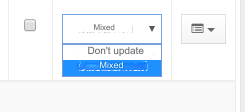
If there are no courses in the selected source for the direction, then the Mixed source is used.
For example: WebMoney WMB => BitCoin BTC - the source NBRB (Belarus) does not have Bitcoin rates
In this case, the search for rates will be carried out using all sources.
Failures to receive rates
You can receive notifications about failures to receive rates. See section: Notifications about failures to receive courses
Info
Rate updated - date of the last update of the course in the direction.
Change date - the date of the last change of any other course data. Varies for all courses.
Operator - the login of the administrator who carried out the last operations with the directions. If the login is System, then auto-updating of courses was started.
Import and export
Import and export only work with .xlsx files (Excel spreadsheet)
Export will create a file that will contain directions taking into account the current filter settings and from all pages of the list
For import, use only those files that were created by export
When importing, only the information that is in the file is updated. Empty fields are ignored.
Rows with empty or invalid identifiers (column A) will be ignored.
The names of payment systems are information fields; changing them will not affect the import operation or the names of payment systems in the script database.
For cells in columns G, M-W, the following rule applies: 0 - no, 1 - yes.
File columns in order from A:
ID - hidden system field
Incoming currency - name of the incoming currency
Outgoing currency - name of the outgoing currency
IN rate - rate of incoming currency (user sends, exchanger receives)
OUT rate - rate of outgoing currency (user receives, exchanger sends)
Commission - referral commission
Negative - is the commission negative
Min.Com. - minimum commission
Max.Com. - maximum commission
Min. Amount - minimum exchange amount
Max. Amount - maximum exchange amount
Source - source of course auto-update (identifier)
Oper. - whether the operator processing type is enabled
S-Auto - whether the semi-automatic type is enabled
Auto - whether the automatic type is enabled
Invoice - is the invoicing type enabled
Active - whether the direction is active
Reg. - whether the direction is available only to registered users
Name - is verification required by first name/last name
Card - is payment card verification required
E-mail - is verification by email required
Mob. - is verification required by mobile phone
Adr. - is verification required by residential address
Dep. - is payment of a deposit required
Last updated