
CryptoProcessing
Description
CryptoProcessing supports operations with cryptocurrencies using two APIs: with the creation of an address (bitcoin_cryptoprocessing) and with a transition to the payment page (cryptoprocessing).
Operations with fiat currencies are only available via the "cryptoprocessing" API.
Account settings
Get an account by contacting the manager on the website: cryptoprocessing.com
Login to your account: https://app.cryptoprocessing.com/en/login
Go to the API Keys section and click Generate API Key.
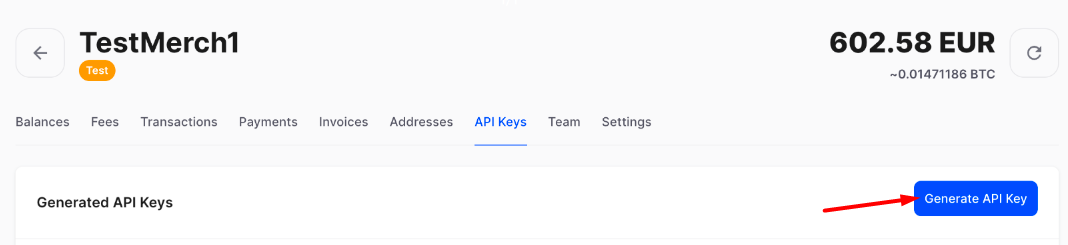
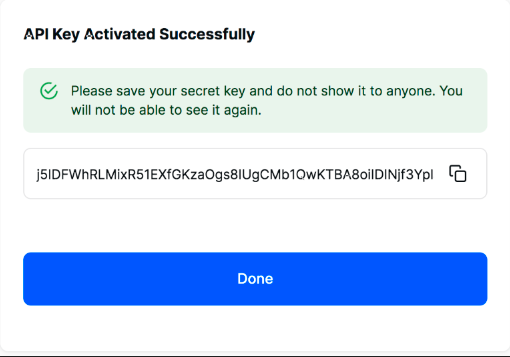
After confirmation you will receive a Secret Key, copy it for settings in the admin panel.
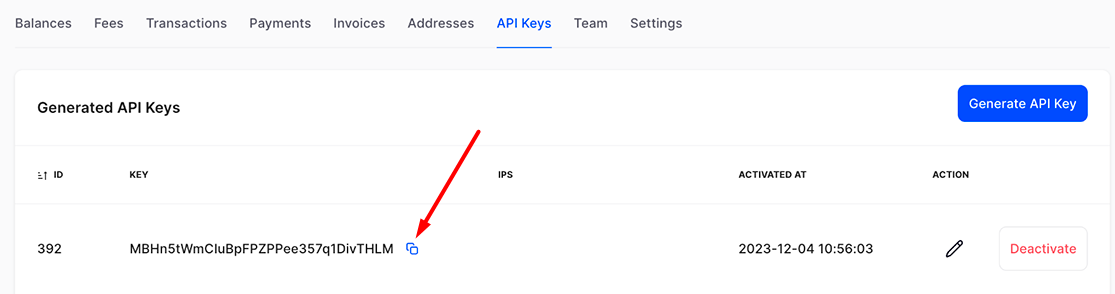
In the list of keys, copy the API key for settings in the admin panel.
Go to the Settings - API section and enter the following value in the Callbacks URL field:
https://site.com/api/changers/cryptoprocessing/charge.php
or
https://site.com/api/changers/bitcoin_cryptoprocessing/charge.php
Depending on the API used. site.com - the address of your website.
Settings in the admin panel
By default, the payment system is disabled.
Go to settings Currency exchange - Payment systems - Disabled - CryptoProcessing USDT
Settings only for types: Semi-automatic and Automatic
API key - from the API keys page of your CryptoProcessing account Secret key - from the API keys page of your CryptoProcessing account Network is a network for multi-network currencies. Possible values: USDTB, USDTE, USDTT. Leave blank if network selection is not needed. Save the settings.
Supported currencies
CryptoProcessing supports the following currencies via the "bitcoin_cryptoprocessing" API: ADA - Cardano BCH - Bitcoin Cash BNB - Binance Coin BRZ - Brazilian Digital Token BTC - Bitcoin CPD - CoinsPaid CSC - CasinoCoin DAI - Dai Stablecoin DOGE - Dogecoin ETH - Ethereum EURS - STASIS EURS LTC - Litecoin SNACK - Crypto Snack TRX - Tron USDC - USD Coin USDT - Tether VERSE - Verse WBTC - Wrapped BTC XED - Exeedme XMR - Ripple CryptoProcessing supports all previous and following currencies via the "cryptoprocessing" API: EUR - Euro USD - US dollar GBP - Pound sterling ARS - Argentine peso IDR - Indonesian rupiah NPR - Nepalese rupee AUD - Australian dollar ILS - Israeli new shekel NZD - New Zealand dollar AZN - Azerbaijani manat INR - Indian rupee PEN - Peruvian sol BDT - Bangladeshi taka JPY - Japanese yen PHP - Philippine peso BRL - Brazilian real KGS - Kyrgyzstani som PLN - Polish zloty BYN - Belarusian ruble KRW - South Korean won RUB - Russian rouble CAD - Canadian dollar KZT - Kazakh tenge SEK - Swedish krona CHF - Swiss franc LKR - Sri Lankan rupee THB - Thai baht CLP - Chilean peso MDL - Moldovan leu TJS - Tajikistani somoni CNY - Chinese yuan renminbi MXN - Mexican peso TRY - Turkish lira CZK - Czech koruna MYR - Malaysian ringgit UAH - Ukrainian hryvnia GEL - Georgian Lari NGN - Nigerian naira VND - Vietnamese dong HUF - Hungarian forint NOK - Norwegian krone ZAR - South African rand
Adding a new payment system based on the CryptoProcessing API. In Bitcoin's example
Name of payment system - Any System type - Electronic currency Currency name - BTC Identifier - any free API - select bitcoin_cryptoprocessing System currency - select BTC - Bitcoin API key - take the API keys page of your CryptoProcessing account Secret key - take the API keys page of your CryptoProcessing account Network - leave blank Save the settings.
Other settings
For a description of other settings, see the section: Payment systems
Last updated