
Nixmoney
Merchant setup
Register on the website: https://www.nixmoney.com/
Login to your account and go to the section: SETTINGS
Fill in the fields:
GENERAL SETTINGS Name - optional. Enable API - check the box and next to it enter the IP of your server for outgoing requests. Look at your main admin panel: Server IP for outgoing requests ALERTINGS Transaction notifications - optional. Save the settings.
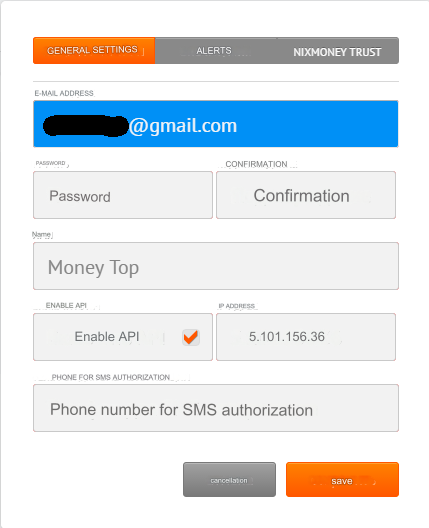
Settings in the admin panel
By default, the payment system is disabled.
Go to settings Currency exchange - Payment systems - Disabled - Nixmoney USD/EUR
Settings only for types: Semi-automatic and Automatic.
Account - enter your Nixmoney account. Prefixed with U for USD and E for EUR E-mail - enter your Nixmoney login E-mail Password - enter your Nixmoney login password Save the settings.
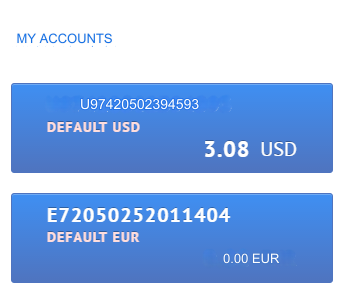
Nuances
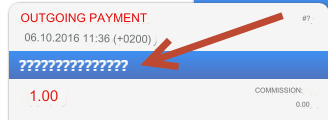
1) Payment to any account from/to your account is not supported and will give an uninformative error. Default from the developers No Records Found. In our case Transaction history error Errors in obtaining history in this payment system are not documented by the payment system developers. If the payment history could not be obtained, an error will be returned: Transaction history error We sent our wishes to document errors and return a description of the error to the payment developers. There was no response. 2) When you go to payment, you see question marks (see screenshot below). The answer to our question about this was: This is how it should be. It is displayed for the reason that the payment system does not yet know which user will pay now; after clicking the continue button and authorization, the payer’s name will be displayed in these places.
Other settings
For a description of other settings, see the section: Payment systems
Last updated