
Templates
List of templates
Global template settings. See section: Training - Templates
Using tags you can display almost any information from any module. See section: System - Tags
All exchanger templates in the template/default/exchange/
directory
index.htm - default home page. Option with blocks
index-min.htm - main page (option with selectors). You can switch it in the admin panel.
index-icons.htm - main page (option with icons). You can switch it in the admin panel.
index-uv.htm - main page (option with two lists). You can switch it in the admin panel.
index-full.htm - main page (option with lists and form). You can switch it in the admin panel.
index_2.htm - second step. Data entry.
index_3.htm - the third step. Checking the entered data.
index_4.htm - completion of exchange for type Processing by operator.
charge.htm - completion of exchange for the Automatic and Semi-automatic types.
charge_ajax.htm - waiting for a payment response for the Automatic and Semi-automatic types.
add_feedback.htm - adding feedback.
feedback.htm - list of reviews.
rqst_reserve.htm - reserve request.
details.htm - transaction details for guests.
print_details.htm - print the transaction for guests.
agre.htm - output of the text of the agreement.
Tips for working with templates
It is possible and recommended to use texts according to directions. See section: Texts by direction
If for some reason there are not enough texts on directions, then:
Depending on the identifier or ID of the payment system, you can display any text.
Identifiers and IDs of payment systems are displayed in the admin panel. Tab Payment systems
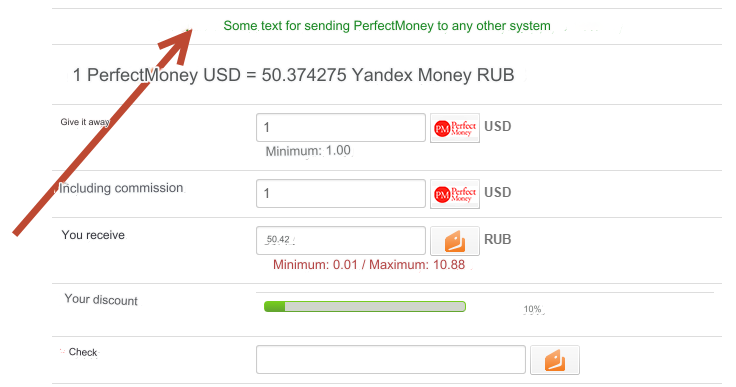
Direction: PerfectMoney to any system.
Into the template: index_2.htm paste in the right place:
{if $fid=='perfectusd'}
<div align="center">
<span class="f_b f_green">Some text for directing PerfectMoney to any other system</span>
</div>
{/if}
As a result we get:
You can display the same text for different payment cards with one insert:
{if $fid=='perfectusd' || $fid=='privat24uah'}
<div align="center">
<span class="f_b f_green">Some text for sending Privat24 UAH and PerfectMoney to any other system</span>
</div>
{/if}
You can display the icon of your Business level [BL]
Open the template file: template/default/header.htm
Find:
{if $EXT[contact_tel]}
Insert before:
{if extend_setting('contact_enable') && extend_setting('contact_wmid')}
<li>BL:<img src="https://bl.wmtransfer.com/img/bl/{extend_setting('contact_wmid')}?w=45&h=25&bg=000" alt="BL"></li>
{/if}
Your WMID is taken from the settings: Modules - Plugins - Settings - Plugin settings Contacts - WMID
Last updated