
Epay
Merchant setup
Register on the website: epay.com
Go to: Account Setting - Account Security
Application Program Interface (API) Enable Next Application Program Interface (API) Details API_KEY - Copy. You will need it in the admin panel. Receive Money - Enable. Pay Online - Enable and enter the server IP for outgoing requests, IP range or subnet. Look on your main admin panel: Server IP for outgoing requests. Important. If the IP is entered incorrectly, the payment API will return the error IP ERROR.
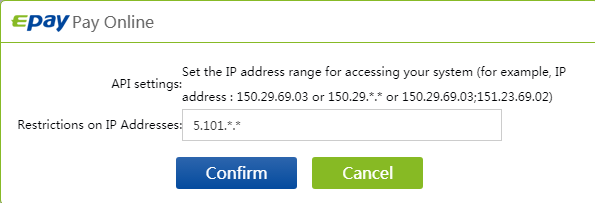
Settings screenshot.
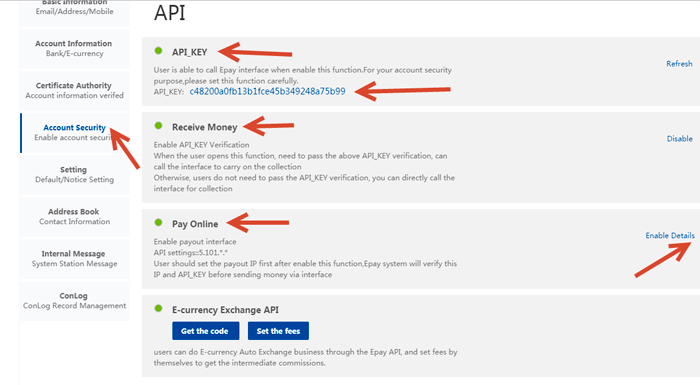
Settings in the admin panel
By default, the payment system is disabled.
Go to settings Currency exchange - Payment systems - Disabled - Epay USD/EUR
Settings only for types: Semi-automatic and Automatic
E-mail - enter the E-mail of your Epay account API KEY - enter the API KEY from the Epay settings Application Program Interface (API) - API Save the settings.
Other settings
For a description of other settings, see the section: Payment systems
Last updated