
How Alerts Work
Description
Alerts are configured in the section: Currency exchange - Basic settings - Notification settings
IMPORTANT! If you use the options: Notifications about rate changes and Notifications about completed exchanges be sure to enable CRON - Cleaning up outdated notifications If you use the option: Alerts about fake exchanges be sure to enable CRON - Generate fake exchange notifications
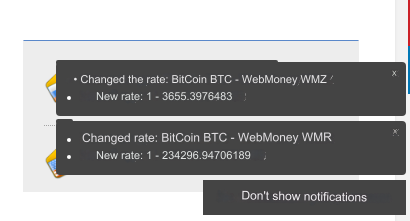
Notifications about rate changes
When this option is enabled, notifications will be displayed about all changed rates.
If you use cryptocurrencies, then it is better not to enable this type of notification. It is logical that you update currencies with CRON frequently, so notifications about rate changes will work continuously.
However, at your request. The user can disable notifications.
Notifications about completed exchanges
When this option is enabled, notifications will be displayed about all completed exchanges.
This option can be enabled for everyone.
Alerts about fake exchanges
When this option is enabled, notifications about existing exchanges will be displayed, randomly repeating their output.
Random - random output, regardless of the time of the completed transaction.
Why did we make this option? To create the appearance that your site is frequently changed.
Perhaps the crowd effect will work. They change it often, which means I need it too!
If there are no exchanges, then fake ones will not be displayed.
It may be worth disabling the Just exchanged block if the output of fakes is enabled.
An attentive user will see the difference. The Just exchanged block may contain other data.
Last updated