
Cloudflare Settings
Description
Cloudflare is an American company providing CDN services, protection against DDoS attacks, secure access to resources and DNS servers. Cloudflare services work as a reverse proxy for the site.
1) Register on cloudflare.com
2) Add your site
3) Choose a plan (in our example, free)
4) Receive new NS
5) Change your NS to NS issued by Cloudflare
Security level
Go to the section Security - Settings - Security Level
Here you can select the security level. Each page has tips and descriptions.
Exception settings
Cloudflare blocks frequent requests, treating them as a flood on the server or DDoS
Currency rates, AJAX requests, in some cases requests from payment services.
To avoid this, you should add exceptions.
Go to the Rules section
1. Exceptions for payments:
Click the Create Page Rule button
Url: yourdomain.com/api/changers/* (yourdomain.com - replace with your site URL)
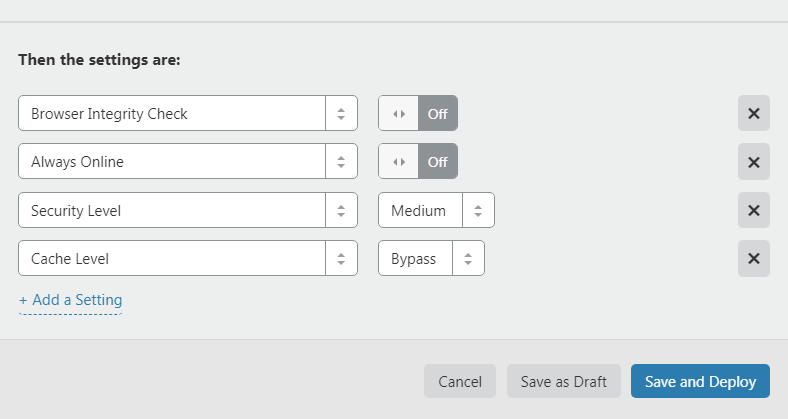
Then the settings are + Add a Settings - click
Browser Integrity Check: OFF
Always Online: OFF
Security Level: Medium или OFF
Cache Level: Bypass
Web Application Firewall: OFF - available for paid plans
2. Exceptions for CRON:
Click the Create Page Rule button
Url: yourdomain.com/api/cron/* (yourdomain.com - replace with your site URL)
Settings are identical to those entered above
3. Exceptions for AJAX requests:
Click the Create Page Rule button
Url: yourdomain.com/ajax/* (yourdomain.com - replace with your site URL)
Settings are identical to those entered above
Authorization
If authorization fails when using the Cloudflare service, then in the file vucmsconf.inc.php (located in the root) find:
$CFG['authadmin'] = 'cookie';
Replaced by:
$CFG['authadmin'] = 'session';
We are not committed to customizing Cloudflare for each client.
There is a detailed guide
Setting up Cloudflare by our employee is a paid service.
Last updated