
Atompark
Settings in the integrator account
Register on the website: Atompark
Replenish your balance on the website: Services - Payment - Top up your account.
Please note: Restrictions by country
For some countries: Registration of the sender's name is required
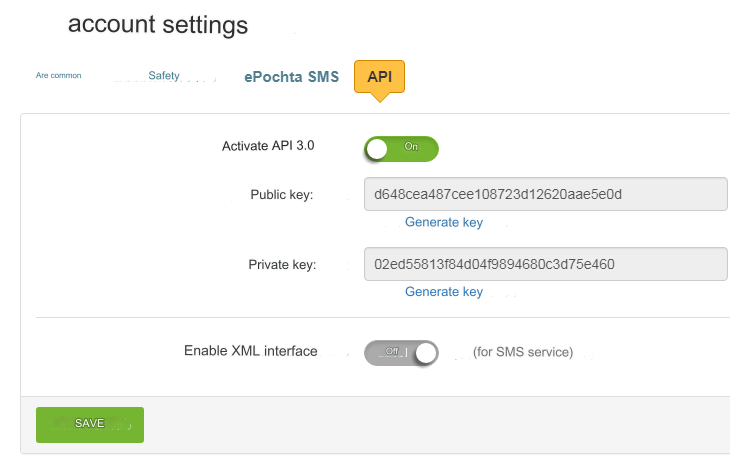
Go => Account settings - API (https://myatompark.com/settings/)
Activate API 3.0 - Enable
Public key character set. Needed for settings in the admin panel.
Private key character set. Needed for settings in the admin panel.
Enable XML interface - Disable
We don’t need all other fields. You can enable and configure the option: Account settings - ePochta SMS - Notify about low balance.
Settings in the admin panel
Go to the tab: Settings => Configuration => SMS
SMS gateway - select Atompark Public Key - enter Public Key from Atompark settings: Account Settings - API Sender - enter Sender's signature from the Atompark settings: SMS distribution - Sender's name. Private key - enter Private key from Atompark settings: Account settings - API Signature in messages - signature at the end of all messages. Enter your signature in Latin. For example: AWEBCOM.COM SMS price - enter your cost for one SMS. Max. number of characters - maximum number of characters in 1 SMS. Enter 160 or 158, depending on the cost of 1 SMS The length of a standard SMS message is 160 characters in Latin and 70 characters in Cyrillic. Characters are programmatically converted to Latin (see: Changing the language of sent SMS). You can enter newsletter texts in Russian. Notification of successful identification - for Atompark, enter OK in Latin
No signature required? If Sender's signature is not a required condition in the Atompark settings for your country, then enter the signature in Latin letters. For example, your domain: awebcom.com Read the signature requirements on the Atompark website: Questions - Answers - Rules for Creating SMS - Rules for Specifying the Sender Name.
Last updated