
Administrators
In this section you can add administrators and define access rights for each of them.
Add an administrator
Enter your username, password and E-mail.
Level - you can type in a name. It can be any title. For example: Accountant, Designer, Copywriter, Journalist, etc.
Group - select an access group. Administrator - almost all access rights (see tooltip below) or Manager - access rights are assigned in the next step.
Add a manager with limited access rights
You can define access rights globally for marked modules, template management and database management. Or on the second step of adding a manager define access rights for each module or section separately. And you can limit the access rights to actions: Manage, Modify, Delete, etc. Access rights can also be limited to access to a specific category. In this way, you can very flexibly customize the manager's access rights to any of the sections. Adding permissions adds available navigation for the manager in the top block, and access rights to sections in the bottom block.
Example of adding permissions for the Article module
Access to sections: Adding, Modifying.
And the possibility of deletion.
And only in the category: Project News.
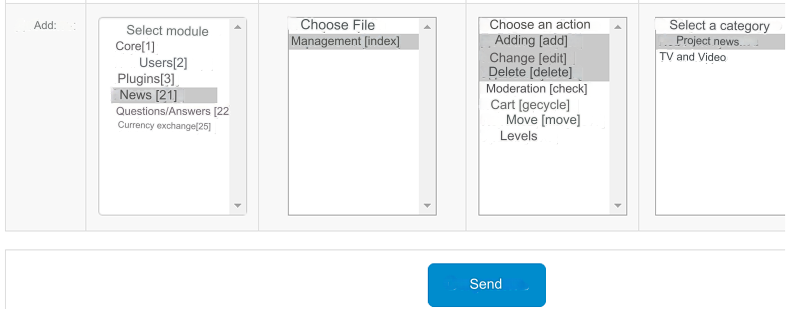
The permissions after adding them look like this
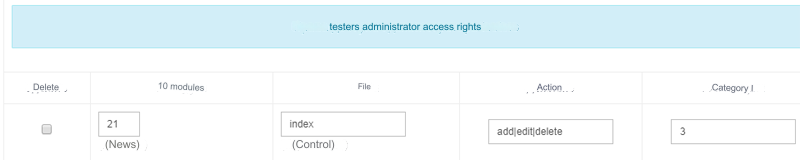
Restricting access
Added Administrator (All Access Rights). Restrictions of access to sections:
Settings - Configuration
Settings for all modules
User Groups
Administrators
Additional fields
Login logs
Modules List (Management)
Templates, Styles
MYSQL
Manager:
Access rights are customizable. To any section that is specified and can be specified. Exception section Administrators. Only the main admin has access to this section
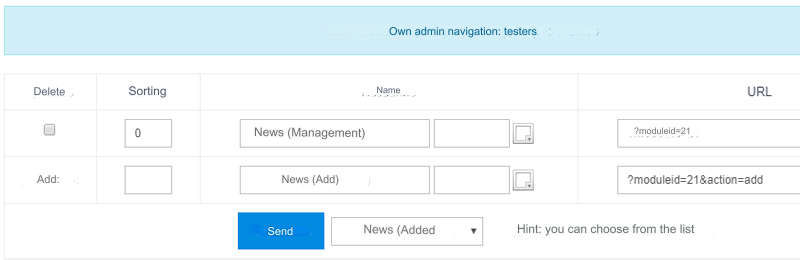
Administrators Navigation
For the added group Administrator (All access rights) navigation does not need to be added.
For the added Manager group, you need to add navigation.
Whichever section you have given access to, add that navigation.
Changing the administrator
You can change your login, password and E-mail.
You can disable two-factor authentication. Change the manager and/or administrator details and disable:
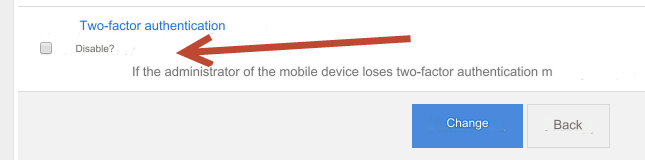
For how to enable two-factor authentication, see section: Training - Two-Factor Authentication
IP Blocking
After three attempts to log in with an incorrect password, the IP of the logged in person will be blocked for one hour.
To remove the block in the file/cache/ban/ directory of your server, delete the file with your IP
Last updated