
Verification
Description
Checking the correctness of data entered by users.
Verification is divided into:
E-mail verification - verification of E-mail. A letter with verification information is sent to the user's email.
Mobile verification - if the option is enabled, you must enable and configure SMS sending. A message with a verification code will be sent to user phone.
Verification by first name, last name - the user uploads supporting documents. Screenshot of a passport, driver’s license, or any other document.
Payment card verification - the user uploads screenshots of the front side of payment cards.
Verification of residential address - the user uploads supporting documents of the residential address.
Verification of bank account number - bank account or account (wallet) of any other system.
Bank account number verification is required when requesting a withdrawal, regardless of whether this type of verification is enabled.
Enabling verification in the section: Users - Module settings - User verification
Verification settings for each group in the section: Users - User groups - Verification
How to limit the processing of applications, see the section: Currency exchange - Directions (options) - Verification by direction
Ability to upload files by users, see section: File storage
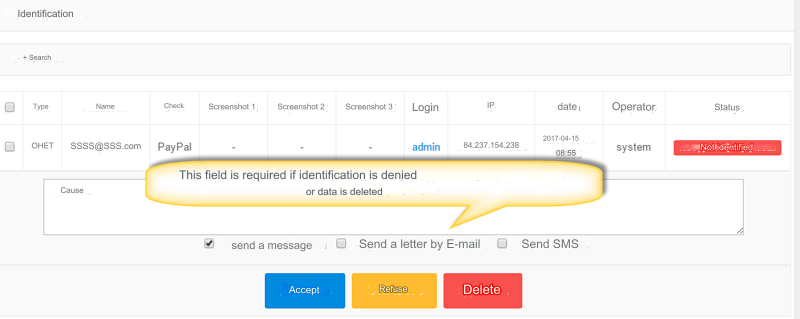
Processing applications
Enter the reason if you refuse verification or delete it.
Select a notification type. Send a personal message, email and/or SMS.
The SMS notification option will be available if this option is enabled and configured
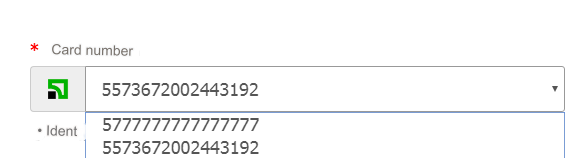
Verification of payment cards is slightly different, due to the fact that there can be an unlimited number of cards.
verified cards are displayed by selector when filling out the application. This option works ONLY for System Type Bank Card.
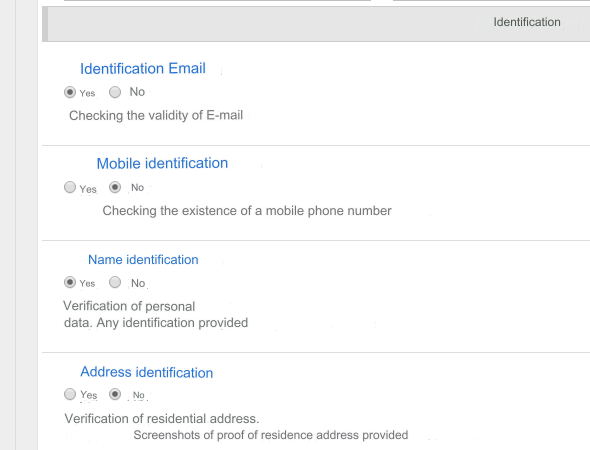
Verification marks in the user card
If for some reason you want to change the user verification data, then change the user data.
Exception, Bank account number verification. This type of verification requires processing of the application.
Verification of bank cards also cannot be enabled in the user’s card.
Last updated